Reports
PDF assessment reports you can hand to a client
A scan is only useful if someone acts on it. The report is where that happens, so it is written for the person who has to decide what to fix, not for the scanner that found it. Below is the complete sample report, with fictional data, in the format planned for the first release.
Download the sample report (PDF, 8 pages, 160 KB)
Illustrative sample. The target, organisations, people and findings are fictional. The format is planned and may change before launch.
What is in the report
| Page | Section | Why it is there |
|---|---|---|
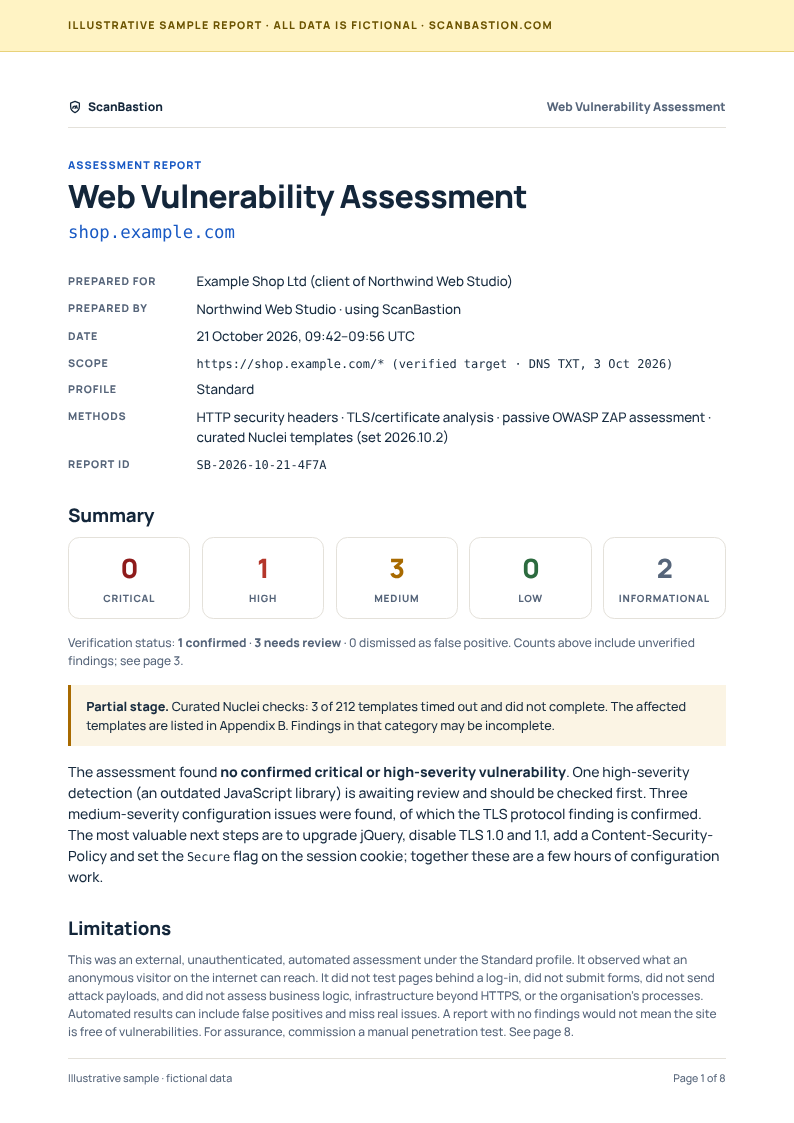
| 1 | Cover, summary, limitations | The counts, the one-paragraph verdict, the partial-stage warning if any, and the limitations, all on the first page. Nobody has to read to page 8 to learn what the scan did not do. |
| 2 | Scope, authorisation, method, coverage | Which hostname, how it was verified, what each stage sent and how many requests, what was excluded or unreachable. |
| 3 | How to read findings; findings overview | A short key to severity, confidence and verification, then every finding in one table. |
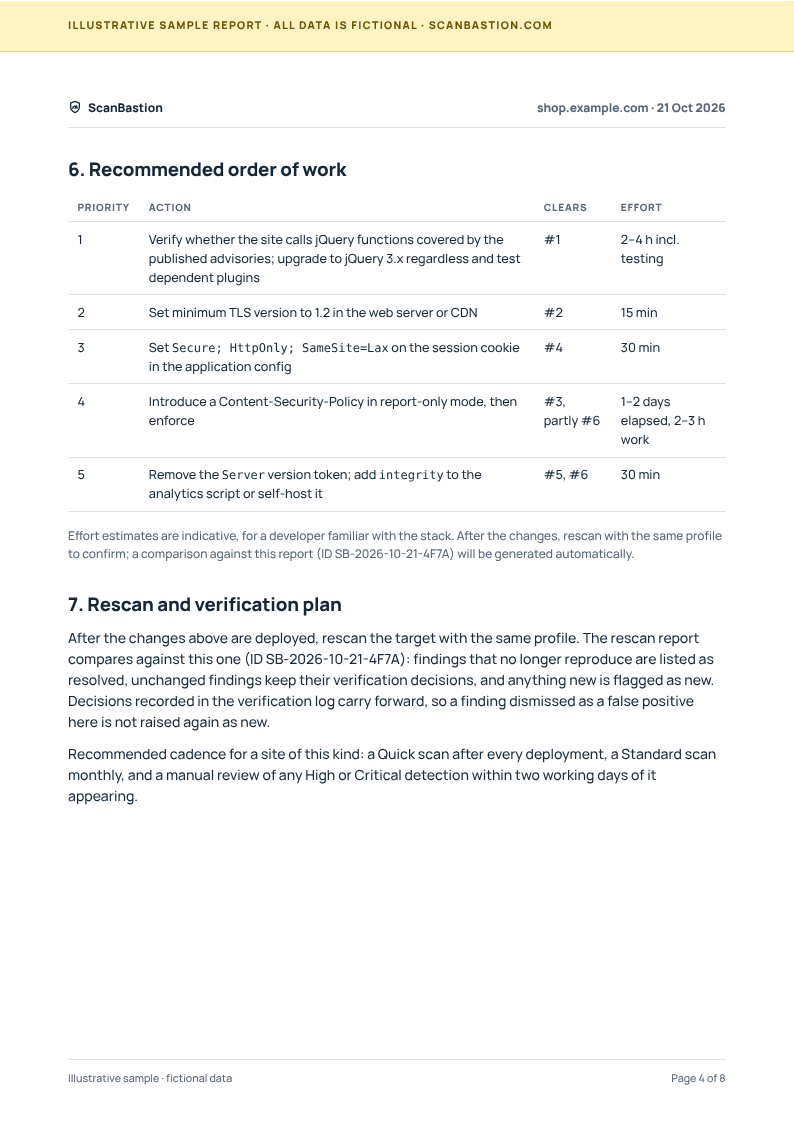
| 4 | Recommended order of work; rescan plan | What to fix first, what each step clears, indicative effort. How the next scan compares against this one. |
| 5 to 7 | One section per finding | Severity, confidence, verification and source; affected URL; what it means in plain language; the request and response excerpt as evidence; a specific remediation. Informational findings in a compact table. |
| 7 | Verification log | Who confirmed or dismissed what, when, with a note. The assessor's judgement, kept separate from the scanner's. |
| 8 | Limitations; stage detail | The not-a-penetration-test statement, false-positive and false-negative caveats, template set version, timed-out templates, scanner identification. Sign-off. |
Five things we insisted on
- Severity, confidence and verification are three fields, never one. "1 High" on the cover is followed immediately by "needs review". A client sees what is confirmed and what is still the scanner's opinion. The guide Severity, confidence, verification explains why.
- Limitations are on page 1. Not in a footnote. If a stage timed out or a URL was blocked, the summary says so before the counts.
- Every finding carries evidence. The request, the relevant response excerpt, the template or rule that fired. A developer can reproduce it without the tool.
- Remediation is specific to what was observed. The exact server directive or cookie attribute, rather than "update your TLS configuration".
- The report knows it is one of a series. Report IDs, a verification log that carries forward, and a rescan plan, so the second report shows what changed rather than restarting the conversation.
Who the report is written for
- The client or site owner reads page 1 and the recommended order of work. It is written to be understood without a security background and to be forwarded as is.
- The developer uses the per-finding pages: evidence to reproduce, a fix to apply, a rescan to confirm.
- You, the assessor, own the verification log and the recommended order. The report shows your judgement as yours, which is what the client is paying for.
Branding and delivery (planned)
- Reports are generated as PDF from the completed scan and kept with the scan history for the retention period of your plan.
- "Prepared by" shows your workspace name. Adding your own logo to the cover and header (white-label) is under consideration for the first release and will be confirmed together with the final pricing.
- A machine-readable export (JSON) of the same findings is planned for a later release.
Frequently asked
Can I edit the report?
Not the PDF directly. You change what it says by verifying or dismissing findings and writing notes in the workspace; the report regenerates from that. This keeps the evidence and your judgement consistent.
Does a clean report mean the site is secure?
No, and the report says so on page 1 and page 8. It means the checks that ran found nothing. See What a website vulnerability scan does and doesn't cover.
Can I send it straight to a client?
It is designed for that. We recommend reading the recommended order of work first and adjusting it to the client's context, which is the part the scanner cannot do.
How was the sample produced?
From the planned template, filled with fictional data chosen to show every section, including a partial stage and a mix of verification states. No real site was scanned.